Are you looking for my non-technical blog?

This is now my technical-only blog, my non-technical blog is here.
Showing posts with label Security. Show all posts

29 January 2006

Egyptian Hackers

The following post has been published on Eglug (Egyptian Linux Users Group) by printf@drupal.org,
I was just wondering if anybody would be interested in such an event? Basically, it should be something like DEF CON, but with more focus on introducing the concepts of and raising the public awareness about the digital world's (in)security as well as providing some means of legal entertainment for the ones with advanced skills. My initial plan was to organize a 2-3 days event with talk sessions/discussion forums about different topics in computer security and on the side a series of challenging games to test the players skills and knowledge.
It is really nice idea to have such kind of events here in Egypt, but the problem is that it is only few people who know what hacking really is. Most of the people here in Egypt and the Middle East think of hacking as the art of using some software tools to get some credit cards numbers or send zillions of packets to a web server to take it out of service. For me, hacking is the art of pushing a system beyond its limits, or forcing it to do things beyond the normal usage of it. I think we may encourage people to participate in some projects like porting linux to new hardwares (smart phones, play station, DSL modems, etc), writing some kernel modules, finding back-doors in some protocols or standards and create tools to use such vulnerabilities, etc.

However we may arrange for such meetings in parallel. A good starting point is a Call for Papers where people shall send some articles or ideas for topics they may talk about. One more thing is having a wiki, which is already there, but more people are encouraged to participate and share their ideas there.

Tags: , ,

27 December 2005

JNCIS-FWV

Today I've passed the JNCIS-FWV exam. The JNCIS-FWV is designed for networking professionals with advanced knowledge of, and experience with, Juniper Firewall/VPN products and ScreenOS software. The JNCIS-FWV exam tests for a wider and deeper level of knowledge than does the JNCIA-FWV exam.
JNCIS-FWV Exam Objectives (Exam: JN0-530)

Tags: , , , , ,

21 December 2005

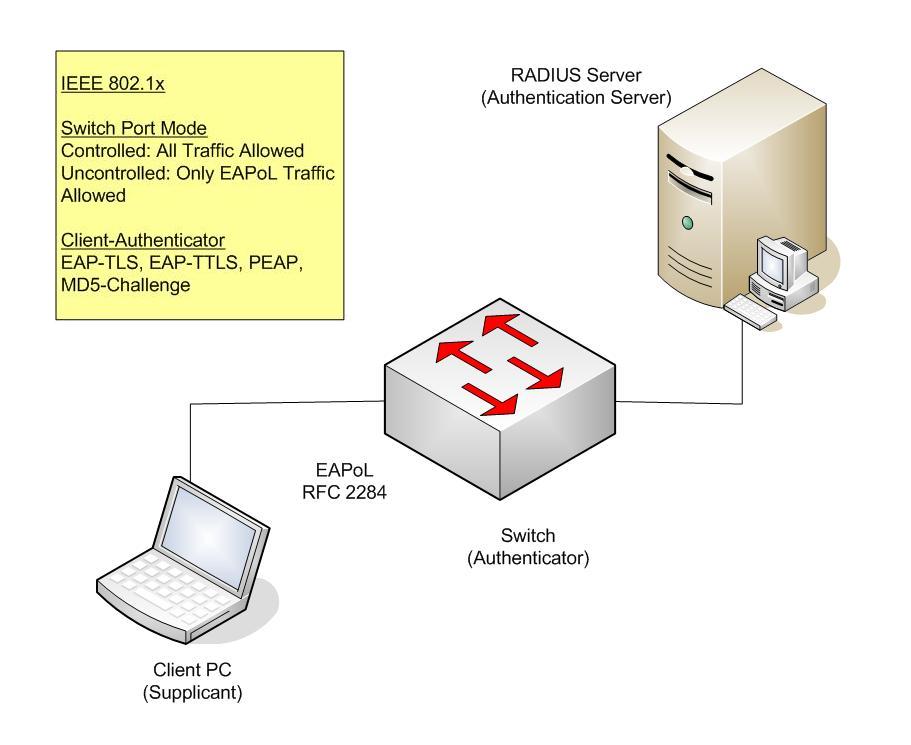
Foundry IEEE 802.1x

To configure a foundry switch in order to authenticate people using their IEEE 802.1x clients on their PCs.

You need to enable the RADIUS authentication on the switch first
BigIron(config)# aaa authentication dot1x default radius
Then you net to tell it the RADIUS server's IP and other parameters
radius-server host 209.157.22.99 auth-port 1812 acct-port 1813 default key abc123 dot1x
Now let only one user has access to ethernet port "3/2"
BigIron(config)# int e 3/2
BigIron(config-if-e100-3/2)# port security
BigIron(config-port-security-e100-3/2)# maximum 2
BigIron(config-port-security-e100-3/2)# exit
Then enable the 802.1x on the switch, and enable multi-user policy
BigIron#(config) dot1x enable
BigIron#(config-dot1x)# multi-user-policy enable
And enable flow-based ACL
BigIron#(config) interface e 3/11
BigIron#(config-if-e1000-3/11)# ip access-group flow-mode
BigIron#(config-if-e1000-3/11)#exit
Configure place holder ACL, just a fake ACL with fake IP in it to redirect the first packet of the session to the CPU

BigIron(config)# access-list 131 deny tcp host 1.1.1.1 any
BigIron(config)# access-list 131 deny udp host 1.1.1.1 any
BigIron(config)# access-list 131 deny icmp host 1.1.1.1 any
BigIron(config)# access-list 131 permit ip any any

BigIron(config) interface e 3/11
BigIron#(config-if-e1000-3/11)# ip access-group flow-mode
BigIron#(config-if-e1000-3/11)# ip access-group 131 in
BigIron#(config-if-e1000-3/11)# ip access-group 131 out
BigIron#(config-if-e1000-3/11)# exit

So, if the source MAC address of the flow is already associated with a successfully authenticated 802.1X host that has a dynamically assigned IP ACL applied to it, then that dynamically assigned IP ACL is applied to the flow. When a port is authenticated using 802.1X security, an IP ACL or MAC address filter that exists in the running-config on the Foundry device can be dynamically applied to the port. To do this, you configure the Filter-ID (type 11) attribute on the RADIUS server. The Filter-ID attribute specifies the name or number of the Foundry IP ACL or MAC address filter. For example, " ip..in", applies the specified numbered ACL to the 802.1X authenticated port in the inbound direction.

So to configure a dynamic ACL to permit incoming traffic from 10.0.0.4 then add the following command to the switch: " access-list 2 permit host 10.0.0.4", and then make the RADIUS send the following attribute value " ip.2.in"
You may do the same but with a MAC filter by applying the following command on the switch: " mac filter 2 permit 3333.3333.3333 ffff.ffff.ffff any etype eq 0800" and let the RADIUS send this: " mac.2.in"

References:
Foundry, Configuring 802.1X Port Security
Foundry, Software-Based IP Access Control Lists (ACLs)

Tags: , , ,

12 December 2005

IEEE OUI & Company ID's

The MAC address is six bytes (48 bits) long, where the first three bytes (OUI) represent the manufacturer of the Network Card. And here is a link from IEEE in order to search for the different OUI's and their equivalent Companies.

One nice trick to know the manufacturer of a certain host is to "ping" it (it has to be in the same subnet with you), and then type "arp -a" to get his MAC address.

http://standards.ieee.org/regauth/oui/index.shtml

Tags: , ,

03 October 2005

Deep Inspection

Deep Inspection is the name of a technology created by NetScreen - acquired by Juniper now - in order to make the Firewalls able to look in the application Layer instead of being limited to the Layer-3 and Layer-4 fields - IP Addresses, Protocol, and Ports. The problem with normal Firewalls was that they were not able to do anything beyond blocking some traffic based on the source and destination addresses and the service used like HTTP, Mail, Telnet, etc. Some applications like FTP and some of Real Time Voice used two streams one for Control the other for Data, and the Data stream was created dynamically based on information passed in the Control stream, so traditional firewalls were not able to deal with such traffic as thy were not able to parse the control stream and open the required ports for the data stream. One more problems was the applications like Kazaa, ICQ, MSN, and Shareaza that use the same ports as other applications, e.g. HTTP and DNS. So the firewalls were required to look in the Application Layer in order to differenciate between these different applications and take actions based on that. That's why Deep Inspection (DI) and Application Layer Gateways (ALG) technologies were created. One of the main advantages of Deep Inspection on NetScreen firewalls that you can add some signatures and take action - Drop or Close the Connection - when the traffic matches them. This is to make firewalls inherit some of the Intrusion Detection capabilities and adding an extra layer of security to your network perimeter.

Tags: , ,

26 September 2005

Basic NetScreen Firewall Configuration

Juniper NetScreen firewalls are one of the most popular firewalls when it comes to High End firewalls. They are installed in the major ISPs and Large Data Centers worldwide. So here is a basic intro to configuring a NetScreen firewall.

You first need a console and the default username and password are "netscreen"/"netscreen". Then you have to determine if you are going to install it in Layer-II mode or LayerIII. We are going to consider the Layer-II (Transparent) mode configuration.

First, put all the interfaces in Layer-II zones (V1-Trust, V1-Untrust, V1-DMZ)
set interface [interface-name] zone [zone-name]
Eg. set interface e1 zone V1-Trust
Then configure an IP address to VLAN1 interface (The management interface in case of Transparent mode operation)
set interface vlan1 ip [ip-address]/[subnet-mask]
Eg. set interface vlan1 ip 10.0.0.1/24
Now after adding the interfaces to different zones, there must be policies in order to allow traffic to cross the different zones ... policies is how you are going to decide who is allowed to communicate with who and with whcih TCP/UDP services
set police from [source-zone] to [destination-zone] [src-ip] [dst-ip] [service] {permit|deny} [log]
Eg. set policy from V1-Trust to V1-Untrust 10.0.0.10 10.0.0.2 FTP permit
Network Configuration
PC1: 10.0.0.10/24 (V1-Trust)
PC2: 10.0.0.2/24 (V1-Untrust)
VLAN1: 10.0.0.1/24

[PC1]------------[Firewall]------------[PC2]

Notes:
  1. In Transparent mode the firewall acts as a bridge in the way the traffic is forwarded, so it is normal for the hosts connected to the different interfaces to have IP addresses from the same subnet.
  2. The default behavior of the firewall is to block traffic between different zones, so you have to create policies in order to path traffic. However this default can be changed.
Tags: , , , ,

24 September 2005

Cross Site Scripting - XSS

Ok, I cannot find any good definition on XSS, so let me write my own one instead.
*** FIXME *** Cross Site Scripting (XSS): Is one of code injection attacks where the attacker inserts some code (or data in general) in a web server in order for that web server (or the victim's web browser) to show or execute that inserted data. *** FIXME ***.
There are three different types of XSS attacks according to wikipedia; however I am going to talk about the third type (Type number 2) here as it is the most interesting and dangerous.

Imagine a web forum where different users can post articles and comments etc. So an attacker can forge his post to contain some HTML tags or JavaScript in stead of clear text. So the result will be the execution of that HTML tags or JavaScript in the other forum visitors' browsers. This can be some HTML tag to redirect users to his own web page, or a JavaScript that can display an annoying message, steal the users session-ID (their logging to that forum), pop-up some window asking them about some info and then sending this info (like credit card number, email address, etc.) to some remote location.

This attack is not limited to web forums only as it can target any sites that takes input from users and displays this input later like blog comments, movies reviews, online web chatting systems, online computer games, etc. Emails can also carry such attacks but it may be called phishing, or Email fraud then.

Many solutions have been used in order to stop such attacks like disabling HTML tags or converting them to normal text before displaying them. Some forums use their own limited tags like [link:"http://www.linux.org"] or [b] and [/b] etc.

12 August 2005

Bye Bye Cisco

Earlier this month Michael Lynn and x-employee in ISS (Internet Security System) gave a speech in the Black Hat forum about some security breaches he has found in Cisco IOS that may get them to their knees. He also explained how this can lead to Arbitrary Code Execution in the Cisco products that may in some stage let hackers to make various exploits and worms that can infect the Cisco routers, switches, etc.

The problem here is not that the Cisco products are that vulnerable and insecure as Michael Lynn said, but it is how Cisco reacted to that speech and decided to sue him and the Black Hat organizers. It is really shameful that a company that has a significant share in security products market reacts that way instead of trying to fix their own security weakness or at least announce that they are going to fix them.

31 July 2005

OpenSSL: Creating Digital Certificate Tutorial

Here is the way to - HOWTO - create a Digital Certificate using OpenSSL software.
First of all install OpenSSL on you PC, and add its bin file to your executables path.

Create your Own CA
Then create some directory to be your CA directory (let's call it demoCA)
Now create the following 3 directories in demoCA (requests, certs, and keys) and create the following to files (database.txt, and serial.txt) and open serial.txt and write 01 in it. Also don't forget to copy the file openssl.conf there too.
Now you need to create your CA key:
"openssl genrsa -des3 -out keys/ca.key 1024"
Create a master certificate based on this key, to use when signing other certificates:
"openssl req -config openssl.conf -new -x509 -days 1001 -key keys/ca.key -out certs/ca.cer"

Create the Digital Certificate
Generate private key for the certificate:
"openssl genrsa -des3 -out keys/foo-key.pem 2048"
Create a certificate request:
"openssl req -new -key keys/foo-key.pem -out requests/foo-req.csr"
Sign the certificate by the CA:
"openssl ca -policy policy_anything -config openssl.conf -cert certs/ca.cer -in requests/foo-req.csr -keyfile keys/ca.key -days 3650 -out certs/foo-cert.cer"
Convert the certificate format to x509 to be used by Windows Internet Explorer
"openssl x509 -in certs/foo-cert.cer -out certs/foo-cert-509.cer"

Note1: For windows users replace all "/" with "\"
Note2: You can get openssl.conf from anywhere, just google for it.
Note: This is how to use a self signed certificate on a Netscreen firewall

Tags: , , , ,